
Durgamata Clock1.10 - Get APK
You'll be able to download in few seconds.
Publisher Description

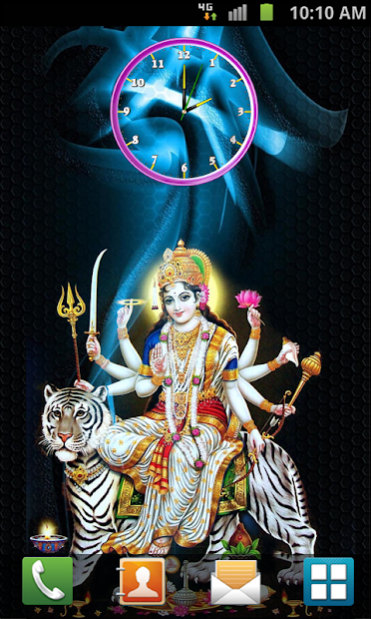


Durga clock live wallpaper:
Durgamata clock is made for android mobiles, download Durga devi analog clock live wallpaper for free. Durga Maa looks like giving a boon to fulfill your all wishes. Durga Maa shows anger over bad and washes out enemies. Maa Durga live wallpaper is a wonderful gift to goddess devotees. Get durga live wallpaper and do prayers whenever you want to do as Durga mayya is always with you in the form of wallpaper. Durga maiah looks graze fully on tiger and also on king of animals that is a Lion. This is the best way of having blessings every second from durgamata.
Features :
* 9 marvelous Durga Devi images
* 4 different fabulous clocks
* 9 fractal background
* superb blending of colors
* easy to install and very easy to use
* drains less battery also
* easy way to know the time
Installation instructions: Home - menu - wallpaper - live wallpaper - durgamata clock.
Other names of Durga : God, Goddess, Maa Durga, Durga Maa, Sakti peets, Kateel Shri Durga Parameshwari, Baliharachandi, Maa Chintpurni Devi,Vijaya Durga Devi, Kalika ji and Bijasan mata, Adichikkavu Sree Durga Devi Kshetram, Akhadachandi, Bhairabi, Chittoorkavu Devi, Durga Mandir, Durgamatha, Durgiana, Kalinchowk Bhagwati Shrine, Kateel, Kodikkunnu Bhagavathy, Kodimoottil Sri Bhadrakaali, Muktidham, Nartiang Durga, Patan Devi, Pathiyoor devi, Polali, Vettikulangara Devi, Vishva Shakti Durga Mandir, Yogeshwari. We always waiting for your valuable suggestions, ideas and comments, please feel free to contact us.
About Durgamata Clock
The company that develops Durgamata Clock is venkateshwara studio. The latest version released by its developer is 1.10.
To install Durgamata Clock on your Android device, just click the green Continue To App button above to start the installation process. The app is listed on our website since 2019-07-16 and was downloaded 0 times. We have already checked if the download link is safe, however for your own protection we recommend that you scan the downloaded app with your antivirus. Your antivirus may detect the Durgamata Clock as malware as malware if the download link to venkateshwara.DurgamataClock is broken.
How to install Durgamata Clock on your Android device:
- Click on the Continue To App button on our website. This will redirect you to Google Play.
- Once the Durgamata Clock is shown in the Google Play listing of your Android device, you can start its download and installation. Tap on the Install button located below the search bar and to the right of the app icon.
- A pop-up window with the permissions required by Durgamata Clock will be shown. Click on Accept to continue the process.
- Durgamata Clock will be downloaded onto your device, displaying a progress. Once the download completes, the installation will start and you'll get a notification after the installation is finished.
Program Details
System requirements
Download information
Pricing
Version History
version 1.10
posted on 2019-07-16
version 1.7
posted on 2016-07-14
small bug fixes,added background,added clocks
Disclaimer
External Download
We do not host Durgamata Clock on our servers. We did not scan it for viruses, adware, spyware or other type of malware. This app is hosted by Galad and passed their terms and conditions to be listed there. We recommend caution when installing it.
The APK Download link for Durgamata Clock is provided to you by apps112.com without any warranties, representations or guarantees of any kind, so access it at your own risk.
If you have questions regarding this particular app contact the publisher directly. For questions about the functionalities of apps112.com contact us.
